As you know that a preference node holds only string values. Therefore the Preferences class provides some convenient methods to convert the Java types into string.

Getting and Setting Java Type Values in a Preference


As you know that a preference node holds only string values. Therefore the Preferences class provides some convenient methods to convert the Java types into string. For example, the method prefs.putBoolean("Boolean", true) converts a Boolean value into a string and then saves the string value and the method prefs.putBoolean("Boolean", true) converts the string back into the Boolean value. Similarly the other Java types are converted into the string. You can see in the given example that we have used the conversion methods for Boolean, int, long, float, double. To specify all these Java Types in the Preference tree, we have define a node 'Java Types'.
Here is the code of JavaTypes.java
import java.util.prefs.*;
|
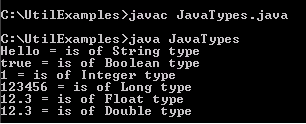
Output will be displayed as: