Intersection means 'the common part'. Classes Rectangle2D and Ellipse2D are provided by the package java.awt.geom.*.
Show Intersection between the Area of two Shapes


This section illustrates you how to show the intersection between the area of shapes in Graphics.
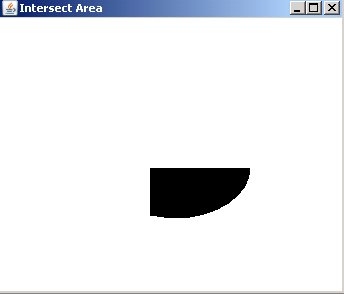
Intersection means 'the common part'. Classes Rectangle2D and Ellipse2D are provided by the package java.awt.geom.*. These classes provides the shapes rectangle and oval respectively. Object of Area class is created to pass the object of shape class into its constructor. Set the size of rectangle with rect.setFrame(150, 150, 150, 100) and size of oval with oval.setFrame(100, 100, 150, 100).
Following code shows the intersection between the two shapes:
| area1.intersect(area2); |
Here is the code of IntersectAreaExample.java
import java.awt.*;
|
Output will be displayed as: