
Swing supports data transfer through drag and drop, copy-paste, cut-paste etc. Data transfer works between Swing components within an application and between Java and native applications.

Data Transfer


Swing supports data transfer through drag and drop, copy-paste, cut-paste etc. Data transfer works between Swing components within an application and between Java and native applications. The ability of data transfer is beneficial to programs between Java applications, between components etc.
There are two ways to transfer data. These are:
1.
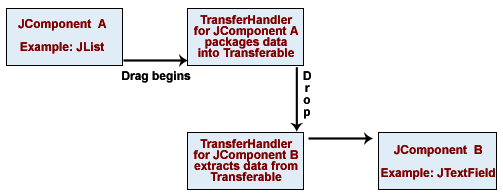
The diagram below displays the Drag and drop (DnD) functionality
of Swing.
2. The diagram below displays the cut/copy and paste functionality of Swing. That is the clipboard transfer via cut/copy and paste. The path of the data is shown by the arrows.
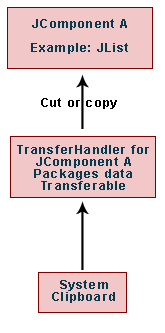
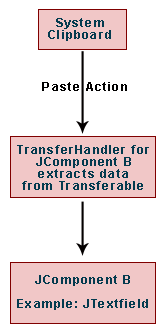
To be more precise, first of all the bundling of data takes place into a package known as Transferable to begin Data Transfer. Then the data gets extracted by an object i.e. TransferHandler from the Transferable which is provided by the component.
