In this section of Java graphic tutorial, you are going to study about the how to give different color effects like Brightness, Contrast to your Image.
Color Effect On Image


In this section of Java graphic tutorial, you are going to study about the
how to give different color effects like Brightness,
Contrast to your Image.
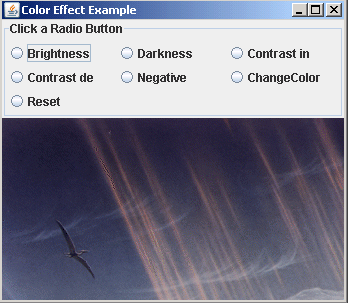
We are providing you an example, where an image shows different color
effects. We have used the radio buttons for choosing color effects like Brightness, Contrast
Increase, Contrast Decrease, Darkness, Negative, ChangeColor and Reset. The ActionListener
class is used to call those effects on the image.
Following code gets the default ToolKit and
returns an image which gets pixel data from the specified file:
| Toolkit.getDefaultToolkit().getImage("image2.gif") |
The MediaTracker class provides a number of
media objects including images. Create an
object of MediaTracker and call its addImage() method for
the image to be
tracked. The method waitForAll()
starts loading image tracked by the media tracker.
LookUpTable class contains
data arrays for one or more components of an image. ShortLookupTable is a
subclass of LookUpTable , which contains short data. To implements a lookup operation from the source to the
destination, we have used the class LookUpOp. The
ColorSpace class represents a color space resource for a color. The ColorConvertOp
class performs a pixel-to-pixel color conversion of the data in the source
image. The ColorSpace.getInstance(ColorSpace.CS.Gray) method returns a
ColorSpace representing one of the specific predefined color spaces. The colorConvert.filter()
method converts the color of source BufferedImage. The
method lop.filter(image, image) perform lookup operation on buffered
image.
Here is the code of ImageColorEffect.java
import java.awt.*;

import java.awt.event.*;

import java.awt.image.*;

import javax.swing.*;

import java.awt.color.ColorSpace;

import javax.swing.border.TitledBorder;


public class ImageColorEffect extends JFrame implements ActionListener {

  DisplayPanel displayPanel;

  JRadioButton brightButton, darkButton, contrastIButton, contrastDButton,

  reverseButton, changeButton, resetButton;


  public ImageColorEffect() {

  super("Color Effect Example");

  Container container = getContentPane();

  displayPanel = new DisplayPanel();

  container.add(displayPanel);

  JPanel panel = new JPanel();

  panel.setLayout(new GridLayout(3, 2));

  panel.setBorder(new TitledBorder("Click a Radio Button"));

  ButtonGroup group = new ButtonGroup();


  brightButton = new JRadioButton("Brightness",false);

  panel.add(brightButton);

  group.add(brightButton);

  brightButton.addActionListener(this);


  darkButton = new JRadioButton("Darkness",false);

  panel.add(darkButton);

  group.add(darkButton);

  darkButton.addActionListener(this);


  contrastIButton = new JRadioButton("Contrast in",false);

  panel.add(contrastIButton);

  group.add(contrastIButton);

  contrastIButton.addActionListener(this);


  contrastDButton = new JRadioButton("Contrast de",false);

  panel.add(contrastDButton);

  group.add(contrastDButton);

  contrastDButton.addActionListener(this);


  reverseButton = new JRadioButton("Negative",false);

  panel.add(reverseButton);

  group.add(reverseButton);

  reverseButton.addActionListener(this);


  changeButton = new JRadioButton("ChangeColor",false);

  panel.add(changeButton);

  group.add(changeButton);

  changeButton.addActionListener(this);


  resetButton = new JRadioButton("Reset",false);

  panel.add(resetButton);

  group.add(resetButton);

  resetButton.addActionListener(this);


  container.add(BorderLayout.NORTH, panel);


  addWindowListener(new WindowEventHandler());

  setSize(displayPanel.getWidth(), displayPanel.getHeight() + 25);

  show();

  }

 class WindowEventHandler extends WindowAdapter {

  public void windowClosing(WindowEvent e) {

  System.exit(0);

  }

  }

 public static void main(String arg[]) {

  new ImageColorEffect();

  }

 public void actionPerformed(ActionEvent e) {

  JRadioButton rbutton = (JRadioButton) e.getSource();

  if (rbutton.equals(brightButton)) {

  displayPanel.brightenLUT();

  displayPanel.applyFilter();

  displayPanel.repaint();

  } else if (rbutton.equals(darkButton)) {

  displayPanel.darkenLUT();

  displayPanel.applyFilter();

  displayPanel.repaint();

  } else if (rbutton.equals(contrastIButton)) {

  displayPanel.contrastIncLUT();

  displayPanel.applyFilter();

  displayPanel.repaint();

  } else if (rbutton.equals(contrastDButton)) {

  displayPanel.contrastDecLUT();

  displayPanel.applyFilter();

  displayPanel.repaint();

  } else if (rbutton.equals(reverseButton)) {

  displayPanel.reverseLUT();

  displayPanel.applyFilter();

  displayPanel.repaint();

  } else if (rbutton.equals(changeButton)) {

  displayPanel.repaint();

  displayPanel.grayOut();

  } else if (rbutton.equals(resetButton)) {

  displayPanel.reset();

  displayPanel.repaint();

  }

  }

  }

class DisplayPanel extends JPanel {

  Image disImage;

  BufferedImage image;

  Graphics2D graph;

  LookupTable lookup;


  DisplayPanel() {

  setBackground(Color.black);

  loadImage();

  setSize(disImage.getWidth(this), disImage.getWidth(this));

  createBufferedImage();

  }

public void loadImage() {

  disImage = Toolkit.getDefaultToolkit().getImage(

  "image2.gif");

  MediaTracker media = new MediaTracker(this);

  media.addImage(disImage, 1);

  try {

  media.waitForAll();

  } catch (Exception e) {}


  if (disImage.getWidth(this) == -1) {

  System.out.println("file not found");

  System.exit(0);

  }

  }

public void createBufferedImage() {

  image = new BufferedImage(disImage.getWidth(this), disImage

  .getHeight(this), BufferedImage.TYPE_INT_ARGB);


  graph = image.createGraphics();

  graph.drawImage(disImage, 0, 0, this);

  }

 public void brightenLUT() {

  short brighten[] = new short[256];

  for (int i = 0; i < 256; i++) {

  short pixelValue = (short) (i + 10);

  if (pixelValue > 255)

  pixelValue = 255;

  else if (pixelValue < 0)

  pixelValue = 0;

  brighten[i] = pixelValue;

  }

  lookup = new ShortLookupTable(0, brighten);

  }

public void darkenLUT() {

  short brighten[] = new short[256];

  for (int i = 0; i < 256; i++) {

  short pixelValue = (short) (i - 10);

  if (pixelValue > 255)

  pixelValue = 255;

  else if (pixelValue < 0)

  pixelValue = 0;

  brighten[i] = pixelValue;

  }

  lookup = new ShortLookupTable(0, brighten);

  }

 public void contrastIncLUT() {

  short brighten[] = new short[256];

  for (int i = 0; i < 256; i++) {

  short pixelValue = (short) (i * 1.2);

  if (pixelValue > 255)

  pixelValue = 255;

  else if (pixelValue < 0)

  pixelValue = 0;

  brighten[i] = pixelValue;

  }

  lookup = new ShortLookupTable(0, brighten);

  }

public void contrastDecLUT() {

  short brighten[] = new short[256];

  for (int i = 0; i < 256; i++) {

  short pixelValue = (short) (i / 1.2);

  if (pixelValue > 255)

  pixelValue = 255;

  else if (pixelValue < 0)

  pixelValue = 0;

  brighten[i] = pixelValue;

  }

  lookup = new ShortLookupTable(0, brighten);

  }

public void reverseLUT() {

  byte reverse[] = new byte[256];

  for (int i = 0; i < 256; i++) {

  reverse[i] = (byte) (255 - i);

  }

  lookup = new ByteLookupTable(0, reverse);

  }

public void reset() {

  graph.setColor(Color.black);

  graph.clearRect(0, 0, image.getWidth(this), image.getHeight(this));

  graph.drawImage(disImage, 0, 0, this);

  }

  public void grayOut() {

  ColorConvertOp colorConvert = new ColorConvertOp(ColorSpace

  .getInstance(ColorSpace.CS_GRAY), null);

  colorConvert.filter(image, image);

  }

 public void applyFilter() {

  LookupOp lop = new LookupOp(lookup, null);

  lop.filter(image, image);

  }

 public void update(Graphics g) {

  g.clearRect(0, 0, getWidth(), getHeight());

  paintComponent(g);

  }

 public void paintComponent(Graphics g) {

  super.paintComponent(g);

  Graphics2D g2D = (Graphics2D) g;

  g2D.drawImage(image, 0, 0, this);

  }

}
|
Output will be displayed as:
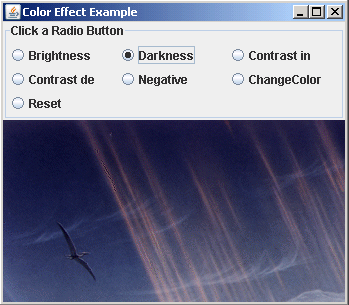
On clicking to the 'Darkness' radio button, darkness will increase.
Download Source Code