In this section, you will learn how to create chess game in java swing.
Chess Application In Java Swing


In this section, you will learn how to create chess game in java swing.
In the given example, we have defined MouseListener, MouseMotionListener perform two actions.
This chess simulator will help you to master your chess playing skills, to train your intellectual capacity and give you lots of entertainment.
Mouse events notify when the user uses the mouse to interact with a component. Mouse events occur when the cursor enters or exits a component's on screen area and when the user presses or releases one of the mouse buttons.
Here is the Code.
|
import java.awt.*; import java.awt.event.*; import java.util.*; import javax.swing.*; public class ChessGameDemo extends JFrame implements MouseListener, MouseMotionListener { JLayeredPane layeredPane; JPanel chessBoard; JLabel chessPiece; int xAdjustment; int yAdjustment; public ChessGameDemo(){ Dimension boardSize = new Dimension(600, 600); // Use a Layered Pane for this this application layeredPane = new JLayeredPane(); getContentPane().add(layeredPane); layeredPane.setPreferredSize(boardSize); layeredPane.addMouseListener(this); layeredPane.addMouseMotionListener(this); //Add a chess board to the Layered Pane chessBoard = new JPanel(); layeredPane.add(chessBoard, JLayeredPane.DEFAULT_LAYER); chessBoard.setLayout( new GridLayout(8, 8) ); chessBoard.setPreferredSize( boardSize ); chessBoard.setBounds(0, 0, boardSize.width, boardSize.height); for (int i = 0; i < 64; i++) { JPanel square = new JPanel( new BorderLayout() ); chessBoard.add( square ); int row = (i / 8) % 2; if (row == 0) square.setBackground( i % 2 == 0 ? Color.blue : Color.white ); else square.setBackground( i % 2 == 0 ? Color.white : Color.blue ); } //Add a few pieces to the board JLabel piece = new JLabel( new ImageIcon("/home/vinod/amarexamples/chess.jpg") ); JPanel panel = (JPanel)chessBoard.getComponent(0); panel.add(piece); piece = new JLabel(new ImageIcon("/home/vinod/amarexamples/chess1.jpg")); panel = (JPanel)chessBoard.getComponent(15); panel.add(piece); piece = new JLabel(new ImageIcon("/home/vinod/amarexamples/king.jpg")); panel = (JPanel)chessBoard.getComponent(16); panel.add(piece); piece = new JLabel(new ImageIcon("/home/vinod/amarexamples/camel.jpg")); panel = (JPanel)chessBoard.getComponent(20); panel.add(piece); } public void mousePressed(MouseEvent e){ chessPiece = null; Component c = chessBoard.findComponentAt(e.getX(), e.getY()); if (c instanceof JPanel) return; Point parentLocation = c.getParent().getLocation(); xAdjustment = parentLocation.x - e.getX(); yAdjustment = parentLocation.y - e.getY(); chessPiece = (JLabel)c; chessPiece.setLocation(e.getX() + xAdjustment, e.getY() + yAdjustment); chessPiece.setSize(chessPiece.getWidth(), chessPiece.getHeight()); layeredPane.add(chessPiece, JLayeredPane.DRAG_LAYER); } //Move the chess piece around public void mouseDragged(MouseEvent me) { if (chessPiece == null) return; chessPiece.setLocation(me.getX() + xAdjustment, me.getY() + yAdjustment); } //Drop the chess piece back onto the chess board public void mouseReleased(MouseEvent e) { if(chessPiece == null) return; chessPiece.setVisible(false); Component c = chessBoard.findComponentAt(e.getX(), e.getY()); if (c instanceof JLabel){ Container parent = c.getParent(); parent.remove(0); parent.add( chessPiece ); } else { Container parent = (Container)c; parent.add( chessPiece ); } chessPiece.setVisible(true); } public void mouseClicked(MouseEvent e) { } public void mouseMoved(MouseEvent e) { } public void mouseEntered(MouseEvent e){ } public void mouseExited(MouseEvent e) { } public static void main(String[] args) { JFrame frame = new ChessGameDemo(); frame.setDefaultCloseOperation(DISPOSE_ON_CLOSE ); frame.pack(); frame.setResizable(true); frame.setLocationRelativeTo( null ); frame.setVisible(true); } } |
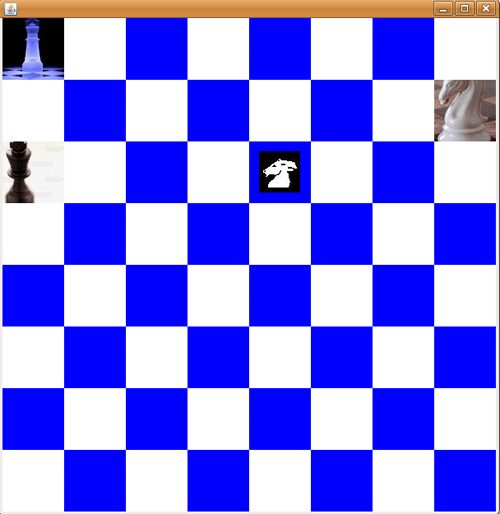
Output is the Program