
The radio tag is a UI tag that render a radio button input field.
The following Example will shows how to implement the radio tag in the Struts2.2.1 --
First we create a JSP file named RadioTag.jsp as follows.ADS_TO_REPLACE_1
|
<%@ page language="java" contentType="text/html; charset=UTF-8" pageEncoding="UTF-8"%> <!DOCTYPE html PUBLIC "-//W3C//DTD HTML 4.01 Transitional//EN"ADS_TO_REPLACE_2 "http://www.w3.org/TR/html4/loose.dtd"> <%@taglib prefix="s" uri="/struts-tags"%> <html>ADS_TO_REPLACE_3 <head> <meta http-equiv="Content-Type" content="text/html; charset=UTF-8"> <title>Example radio Tag</title>ADS_TO_REPLACE_4 </head> <body> <s:form action="ResultRadioTag.action">ADS_TO_REPLACE_5 <h2>Fill Your Details.</h2> <s:textfield name="username" key="Name"></s:textfield> <s:radio list="#{'Male':'Male','Female':'Female'}" value="Gender"ADS_TO_REPLACE_6 name="list1"></s:radio> <s:radio list="#{'Single':'Single','Married':'Married'}" value="Status" name="list2"></s:radio>ADS_TO_REPLACE_7 <s:radio list="#{'UnEmployed':'UnEmployed','Employed':'Employed', 'Self Employed':'Self Employed'}"ADS_TO_REPLACE_8 value="Employement" name="list3"></s:radio> <s:submit></s:submit> </s:form>ADS_TO_REPLACE_9 </body> </html> |
The Struts mapping file Struts.xml is as follows-
|
<?xml version="1.0" encoding="UTF-8"?>ADS_TO_REPLACE_10 <!DOCTYPE struts PUBLIC "-//Apache Software Foundation//DTD Struts Configuration 2.0//EN" "http://struts.apache.org/dtds/struts-2.0.dtd">ADS_TO_REPLACE_11 <struts> <constant name="struts.enable.DynamicMethodInvocation" value="false" /> <constant name="struts.devMode" value="false" />ADS_TO_REPLACE_12 <constant name="struts.custom.i18n.resources" value="ApplicationResources" /> <package name="default" namespace="/" extends="struts-default"> <action name="RadioTag" class="roseindia.RadioTag" method="display">ADS_TO_REPLACE_13 <result name="none">/RadioTag.jsp</result> </action> <action name="ResultRadioTag" class="roseindia.RadioTag">ADS_TO_REPLACE_14 <result name="success">/result.jsp</result> </action> </package>ADS_TO_REPLACE_15 </struts> |
Here is the result.jsp
|
<%@ page language="java" contentType="text/html; charset=UTF-8" pageEncoding="UTF-8"%>ADS_TO_REPLACE_16 <!DOCTYPE html PUBLIC "-//W3C//DTD HTML 4.01 Transitional//EN" "http://www.w3.org/TR/html4/loose.dtd"> <%@taglib prefix="s" uri="/struts-tags" %>ADS_TO_REPLACE_17 <html> <head> <meta http-equiv="Content-Type" content="text/html; charset=UTF-8">ADS_TO_REPLACE_18 <title>Example radio Tag</title> </head> <body>ADS_TO_REPLACE_19 <h1><s:property value="username"/> Your detail is here</h1> Welcome Dear friend,<s:property value="username"/><br> Your Gender is : <s:property value="list1"/><br>ADS_TO_REPLACE_20 Your Status is :<s:property value="list2"/><br> Your are a <s:property value="list3"/> Person. </body>ADS_TO_REPLACE_21 </html> |
The action class RadioTag.java is as follows.
|
package roseindia; import com.opensymphony.xwork2.ActionSupport;ADS_TO_REPLACE_22 public class RadioTag extends ActionSupport { private String username; private String list1;ADS_TO_REPLACE_23 private String list2; private String list3; public String execute() throws Exception {ADS_TO_REPLACE_24 return SUCCESS; } public String getList1() {ADS_TO_REPLACE_25 return list1; } public void setList1(String list1) {ADS_TO_REPLACE_26 this.list1 = list1; } public String getList2() {ADS_TO_REPLACE_27 return list2; } public void setList2(String list2) {ADS_TO_REPLACE_28 this.list2 = list2; } public String getList3() {ADS_TO_REPLACE_29 return list3; } public void setList3(String list3) {ADS_TO_REPLACE_30 this.list3 = list3; } public String getUsername() {ADS_TO_REPLACE_31 return username; } public void setUsername(String username) {ADS_TO_REPLACE_32 this.username = username; } public String display() {ADS_TO_REPLACE_33 return NONE; } } |
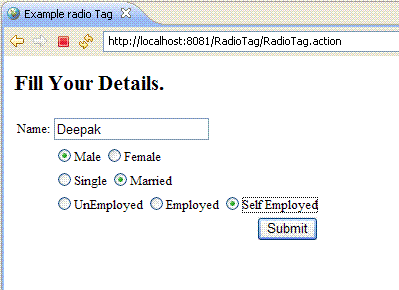
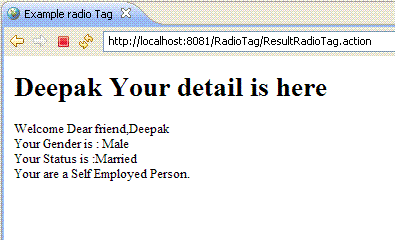
This Program produces output on the basis of the Radio Tag evaluation, This give the output as-ADS_TO_REPLACE_34
Output:-

 ADS_TO_REPLACE_35
Advertisements
Ads
Ads
