
Downloading Struts & Hibernate


In this we will download Struts & Hibernate and setup the development environment.
Downloading Hibernate
Hibernate is free open source software it can be download from http://www.hibernate.org/. Visit http://www.hibernate.org/ and then click on the Download link to go to the download page. From the download page download the current latest release of Hibernate Core. For this tutorial I have downloaded Hibernate hibernate-3.1.1.zip.
Download Struts
The latest release of Struts can be downloaded from http://struts.apache.org/download.cgi. For this tutorial I have download struts-1.2.9-bin.zip. Save downloaded file into your hard disk.
Downloading Ant
Ant is a free tool under GNU Licence and is freely available at http://jakarta.apache.org/ant/ , current version of ant is 1.6.5. Ant allows the developer to automate the repeated process involved in the development of J2EE application. Developers can easily write the script to automate the build process like compilation, archiving and deployment. For this tutorial I am using apache-ant-1.6.5.
Download MySQL JDBC Driver
Download mysql-connector-java-3.0.16-ga-bin.jar from here mysql-connector-java-3.0.16-ga-bin.jar
or you can download and use the latest version of mysql jdbc driver. Copy the
JDBC driver file (mysql-connector-java-3.0.16-ga-bin.jar or latest version) to
the jakarta-tomcat-5.5.9\common\lib directory of your tomcat
installation. This will add the MySQL JDBC driver to the tomcat server.
Setting Up Development Environment
First we will create necessary directories and moved the required files to the appropriate directory. Follow the following steps to accomplish this:
1. Create a directory in you c: drive called Struts-Hibernate-Integration.2. Unzip Downloaded file in the directory you have downloaded Struts.
3. Go to the "struts-1.2.9-bin\webapps" directory and you will find struts-blank.war, struts-documentation.war, struts-examples.war, struts-mailreader.war and tiles-documentation.war files in the directory. Open struts-blank.war with WinZip and then click on the "Extract" button. WinZip asks for the directory for extracting the file, enter "C:\Struts-Hibernate-Integration" and click on Extract button.
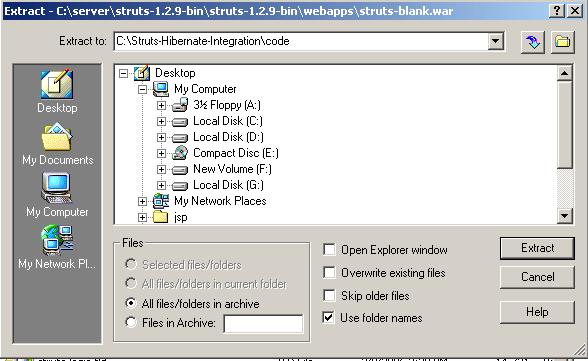
4. A new directory will created "C:\Struts-Hibernate-Integration\code" and the content of struts-blank.war is extracted in the code directory.
5. Now we will add the hibernate code to our development environment. Extract hibernate-3.1.1.zip in the directory where you have downloaded.
6. Copy "hibernate3.jar" from <your downoaded direvory>\hibernate-3.1 into C:\Struts-Hibernate-Integration\code\WEB-INF\lib directory.
7. Copy all the library files from "hibernate-3.1\lib" to "C:\Struts-Hibernate-Integration\code\WEB-INF\lib" directory.
8. Create an directory libext under "C:\Struts-Hibernate-Integration\code\WEB-INF\" . We will used this directory to put extra jar files. Copy servlet-api.jar file your tomcat directory to "C:\Struts-Hibernate-Integration\code\WEB-INF\libext" directory.
9.Change in the build.xml file: Open "C:\Struts-Hibernate-Integration\code\WEB-INF\src\build.xml"
    file in your favourite editor and change as instructed below:

    a) Find "<property name="servlet.jar" value="/javasoft/lib/servlet.jar"/>"
    in the build.xml file and change it to "<property name="servlet.jar"
    value="./libext/servlet-api.jar"/>"

    b) Find "<property name="distpath.project" value="/projects/lib"/>"
    and change it to "<property name="distpath.project" value="../../dist"/>"

    c) Change "<property name="jdbc20ext.jar" value="/javasoft/lib/jdbc2_0-stdext.jar"/>"
    to "<property name="jdbc20ext.jar" value="./libext/jdbc2_0-stdext.jar"/>".

    d) Change "<property name="project.title" value="Jakarta Struts Blank "/>"
    to "<property name="project.title" value="RoseIndia.net
    Struts Hibernate Integration Tutorial "/>"

    e) Change "<property name="project.distname" value="blank"/>"
    to "<property name="project.distname" value="strutshibernate"/>"

    e) Change "<target name="project" depends="clean,prepare,compile,javadoc"/>"
    to "<!--<target name="project" depends="clean,prepare,compile"/>-->"

    You can download my build.xml fom here.
 10. Open console and go to the "C:\Struts-Hibernate-Integration\code\WEB-INF\src"
    directory  and type ant to compile the project. This show the following
    out put:


    C:\Struts-Hibernate-Integration\code\WEB-INF\src>ant

    Buildfile: build.xml


    clean:

   [delete] Deleting directory C:\Struts-Hibernate-Integration\code\WEB-INF\clas

    ses

    [mkdir] Created dir: C:\Struts-Hibernate-Integration\code\WEB-INF\classes


    prepare:


    resources:

     [copy] Copying 1 file to C:\Struts-Hibernate-Integration\code\WEB-INF\class

    es


    compile:


    project:


    dist:

      [jar] Building jar: C:\Struts-Hibernate-Integration\dist\strutshibernate.j

    ar

      [war] Building war: C:\Struts-Hibernate-Integration\dist\strutshibernate.w

    ar

      [war] Warning: selected war files include a WEB-INF/web.xml which will be

    ignored (please use webxml attribute to war task)


    all:


    BUILD SUCCESSFUL

    Total time: 3 seconds

    C:\Struts-Hibernate-Integration\code\WEB-INF\src>


    and it will create C:\Struts-Hibernate-Integration\dist\strutshibernate.war
    file which you can deploy on application server to test. You can ignore
    the warning generated while running the ant build tool.
11. To test the application copy the strutshibernate.war to your tomcat
webapps dirctory and start tomcat.12. Open browser and type http://localhost:8080/strutshibernate/. You browser page should look like:
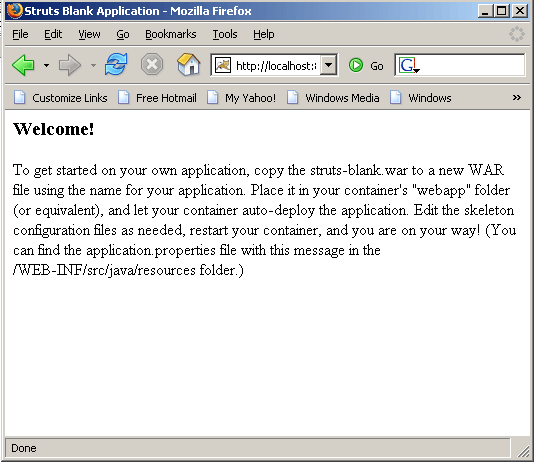
This means you have successfully configured your development environment.