
Facelet include Tag


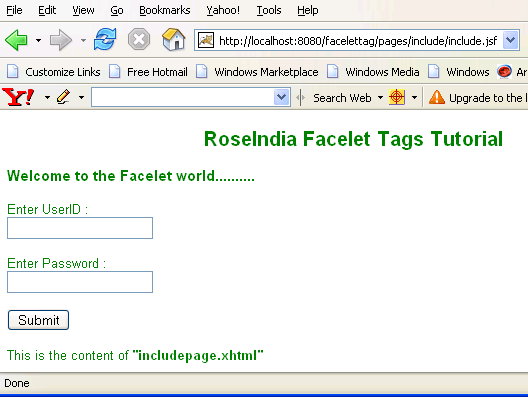
This tag is used to include the content of a page. This page name is specified by src attribute of include tag. The page that has been included should use composition tag or component tag. It may contain xhtml or xml to be included. In the program below, we have used include tag and src attribute is set to "includepage.xhtml". So the content of this page will be included in the "include.xhtml" page and rendered in "includetemplate.xhtml" because insert tag with name attribute set to face5 is used in "includetemplate.xhtml".
include.xhtml:
| <!DOCTYPE html PUBLIC "-//W3C//DTD XHTML 1.0 Transitional//EN"
"http://www.w3.org/TR/xhtml1/DTD/xhtml1-transitional.dtd"> <html xmlns="http://www.w3.org/1999/xhtml" xmlns:ui="http://java.sun.com/jsf/facelets" xmlns:h="http://java.sun.com/jsf/html"> <body> Content above composition tag will not be rendered. <ui:composition template="/pages/include/includetemplate.xhtml"> <ui:define name="face1"> <center><h2>RoseIndia Facelet Tags Tutorial</h2></center> <h3>Welcome to the Facelet world..........</h3> </ui:define> <ui:define name="face2">Enter UserID :<br/> <h:inputText id="it" /><br/><br/> </ui:define> <ui:define name="face3">Enter Password :<br/> <h:inputSecret id="is" /><br/><br/> </ui:define> <ui:define name="face4"> <h:commandButton id="cb" value="Submit" /> </ui:define> <ui:define name="face5"> <ui:include src="includepage.xhtml"/> </ui:define> </ui:composition> Content below composition tag will not be rendered. </body> </html> |
includetemplate.xhtml :
| <!DOCTYPE html PUBLIC "-//W3C//DTD XHTML 1.0 Transitional//EN" "http://www.w3.org/TR/xhtml1/DTD/xhtml1-transitional.dtd"> <html xmlns="http://www.w3.org/1999/xhtml" xmlns:ui="http://java.sun.com/jsf/facelets"> <head> <title>facelet example </title> <link href="../../style/CSS.css" rel="stylesheet" type="text/css"/> </head> <body> <ui:insert name="face1"> </ui:insert> <ui:insert name="face2"> </ui:insert> <ui:insert name="face3"> </ui:insert> <ui:insert name="face4"> </ui:insert> <ui:insert name="face5"> </ui:insert> </body> </html> |
includepage.xhtml : The content in this page that will be included in the "includetemplate.xhtml"
| <!DOCTYPE html PUBLIC
"-//W3C//DTD XHTML 1.0 Transitional//EN" "http://www.w3.org/TR/xhtml1/DTD/xhtml1-transitional.dtd"> <html xmlns="http://www.w3.org/1999/xhtml" xmlns:ui="http://java.sun.com/jsf/facelets"> <ui:composition> <br/><br/>This is the content of <b>"includepage.xhtml"</b> </ui:composition> </html> |
Rendered Output :
Html Source Code :
| <!DOCTYPE html PUBLIC "-//W3C//DTD XHTML 1.0 Transitional//EN" "http://www.w3.org/TR/xhtml1/DTD/xhtml1-transitional.dtd" > <html xmlns="http://www.w3.org/1999/xhtml"> <head> <title>facelet example </title> <link href="../../style/CSS.css" rel="stylesheet" type="text/css" /> </head> <body> <center><h2>RoseIndia Facelet Tags Tutorial</h2></center> <h3>Welcome to the Facelet world..........</h3> Enter UserID :<br /><input id="it" type="text" name="it" /><br /><br /> Enter Password :<br /><input id="is" type="password" name="is" value="" /><br /><br /> <input id="cb" type="submit" name="cb" value="Submit" /> <br /><br />This is the content of <b>"includepage.xhtml"</b> </body> </html> |
This tag contains only one attribute :
src : This is the required attribute that can be a litral or EL expression. This value must specify a facelet whose content will be included in your template document.