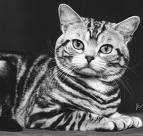
PHP GD Grayscale
This example shows how to Grayscale an image in php gd.
This example shows how to Grayscale an image in php gd.<?php
$file
= 'images.jpg';header(
'Content-type: image/jpeg');list
($width, $height) = getimagesize($file);$source
= imagecreatefromjpeg($file);$bwimage
= imagecreate($width, $height);for
($c=0;$c<256;$c++){
$palette
[$c] = imagecolorallocate($bwimage,$c,$c,$c);}
function
yiq($r,$g,$b){
return
(($r*0.299)+($g*0.587)+($b*0.114));}
for
($y=0;$y<$height;$y++){
for
($x=0;$x<$width;$x++){
$rgb
= imagecolorat($source,$x,$y);$r
= ($rgb >> 16) & 0xFF;$g
= ($rgb >> 8) & 0xFF;$b
= $rgb & 0xFF;
$gs
= yiq($r,$g,$b);imagesetpixel(
$bwimage,$x,$y,$palette[$gs]);}
}
imagejpeg(
$bwimage);?>
After running the program you will get the following output