PHP Create Database
PHP Create Database: In this tutorial you will get to know about how to create database in PHP, using WAMP server, and MySQL console.
PHP Create Database: In this tutorial you will get to know about how to create database in PHP, using WAMP server, and MySQL console.PHP Create Database
To create Database in MySQL:
$) Using MySQL console:
i) Open MySQL console from WAMP server icon

ii) Enter the password (generally it is blank, unless you have set any)
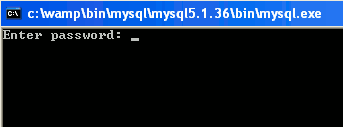
ii) Type create database database_name. Enter your desired database name in place of database_name e.g. create database student or create database Employee etc. SQL is not a case sensitive language, but database name or table name is case sensitive. After that to open the database type use database_name

OR
$) Using phpMyAdmin:
i) Start WAMP server, you'll get the icon on the taskbar as follows (to know how to start WAMP server please visit our webpage: http://roseindia.net/tutorial/php/phpbasics/Running-Testing-Wamp.html)

ii) Click on the icon you will get a menu, as shown below, click on phpMyAdmin option.

iii) After clicking phpMyAdmin option, http://localhost/phpadmin/ page will be open.

iv) Select any appropriate name for your new database in the create new database textbox and click create button.


