PHP Form
PHP Form: In this tutorial you will learn how to pass any data from a html page to a php file, and how to use all those data. To do this we need at least two files one is html file and a php file.
PHP Form: In this tutorial you will learn how to pass any data from a html page to a php file, and how to use all those data. To do this we need at least two files one is html file and a php file.PHP Form
In this tutorial you will learn how to pass any data from a html page to a php file, and how to use all those data. To do this we need at least two files one is html file and a php file. Here's the given example:
userForm.html
<!DOCTYPE html PUBLIC "-//W3C//DTD HTML 4.01 Transitional//EN" "http://www.w3.org/TR/html4/loose.dtd">
<html>
<head>
<meta http-equiv="Content-Type" content="text/html; charset=ISO-8859-1">
<title>User Form</title>
</head>
<body>
<table>
<tr><td>
<fieldset>
<legend>User</legend>
<form method="post" action="userForm.php" onsubmit="return formchk(this)">
<table>
<tr>
<td>Enter your name</td><td><input type="text" name="textb"></input></td>
</tr>
<tr>
<td><input type="submit" value="Submit"></input></td>
<td><input type="reset" value="Reset"></input></td>
</tr>
</table>
</form>
</fieldset>
</td>
</tr>
</table>
</body>
</html>
userForm.php
<?php
$name=$_POST["textb"];
echo"Hello ".$name;
?>
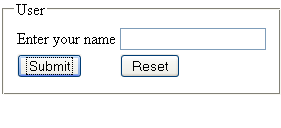
Output:
Hello roseindia


