Jstl c:when,c:choose,c:otherwise tag in jsp
In this Section, we will discuss about how to use JSTL tag ' c:when ' in JSP with a simple example.
In this Section, we will discuss about how to use JSTL tag ' c:when ' in JSP with a simple example.JSTL c:when,c:choose,c:otherwise TAGS IN JSP
In this Section, we will discuss about how to use JSTL tag ' c:when ' in JSP with a simple example.
Basically, the choose, when, and otherwise tags are used to construct an "c:if" statement. These are sub tags of "c:if" tag. The 'c:choose' is like the outermost braces of "if" control statement, 'c:when' is like the block of "if" control statement which executes when the condition is 'True' ,only one difference is that it(c:when) again checks the equality of expression/ value .And the 'c:otherwise' tag is like 'else' of "if " control statement of java.
Syntax :
<c:if test="${ condition
}"> |
EXAMPLE : Given below example, which checks whether a number is even or odd :
CwhenJSTL.jsp
|
<%@ taglib uri="http://java.sun.com/jsp/jstl/core" prefix="c" %>< html>< body>< form method="post"><center>< font color="red"><b>Check even/odd Number</b></font>< br><br>Enter a number:< input type="text" name="enter" />< input type="submit" value="Accept" />< br /></center></ form>< center>< c:if test="${pageContext.request.method=='POST'}">Entered value is:< c:choose>< c:when test="${param.enter%2==0}" >even.< br /></ c:when>< c:otherwise>odd.< br /></ c:otherwise></ c:choose></ c:if></ center></ body></ html> |
OUTPUT :
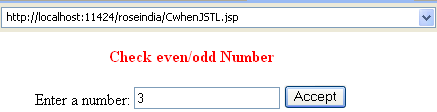
After submitting value the output will be :


