JDBC Select Record Example
In this tutorial we will learn how select specific record from table use mysql JDBC driver.
In this tutorial we will learn how select specific record from table use mysql JDBC driver.JDBC Select Record Example
In this tutorial we will learn how select specific record from table use mysql JDBC driver. This select the one or more row records that follow specific condition i.e user_id=1 or user_name="User1" etc. This tutorial use the mysql query "SELECT * FROM user WHERE user_id=1" , if use the another condition i.e user_name="User1" then fetch the all records that user_name="User1". Table given below as :
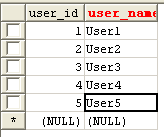
If Change mysql query "SELECT * FROM user WHERE user_user='User1' " , then fetch all row record that user_name =User1.The code of "SelectRecord.java" class is:
import java.sql.DriverManager;
import java.sql.Connection;
import java.sql.Statement;
import java.sql.SQLException;
import java.sql.ResultSet;

public class SelectRecord{
 // JDBC driver name and database URL
 static String driverName = "com.mysql.jdbc.Driver";
 static String url = "jdbc:mysql://localhost:3306/";

 // defined and set value in  dbName, userName and password variables
 static String dbName = "testjdbc";
 static String userName = "root";
 static String password = "";

 public static void main(String[] args){
	// create Connection con, and Statement stmt
	Connection con=null;
	Statement stmt=null;
	try{
		Class.forName(driverName).newInstance();
		con = DriverManager.getConnection(url+dbName, userName, password);
		try{
		  stmt = con.createStatement();
		  String query = "SELECT * FROM user WHERE  user_id=1";
		  ResultSet rs=stmt.executeQuery(query);
		  System.out.println("user_id"+"\t"+"user_name");
		  //Extact result from ResultSet rs
		  while(rs.next()){
System.out.println(""+rs.getInt("user_id")+"\t"+rs.getString("user_name"));
			}
		   // close ResultSet rs
		   rs.close();
		  } catch(SQLException s){
				s.printStackTrace();
			 }
		// close Connection and Statement
		con.close();
		stmt.close();
		}catch (Exception e){
			e.printStackTrace();
		 }
  }
}
Program Output :
| F:\jdbc>javac SelectRecord.java F:\jdbc>java SelectRecord user_id user_name 1 User1 F:\jdbc> |


