Connection using Jdbc-odbc bridge Driver
Jdbc-Odbc bridge driver create connection between java application and 'MS Access database'.
Jdbc-Odbc bridge driver create connection between java application and 'MS Access database'.Connection using JDBC-ODBC bridge driver
JDBCExample.java
import java.sql.*; |
Output
Description of Program
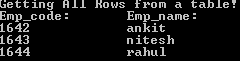
In the above program, Jdbc-Odbc bridge driver create connection between java application and 'MSAccess database'. After creating connection it also execute query.
Description of code
import java.sql -- Since 'java.sql' class support all the methods needed to create connection. we need to import it first.
Connection con;-- Creation of "connection" class object ,which is used to represent connection and also used to create "statement" class object for executing query.
Class.forName("sun.jdbc.odbc.JdbcOdbcDriver"); --In this program "forName()" function is used to load the JDBC-ODBC bridge driver. It takes driver name as an argument and load it by checking it's availability.
con=DriverManager.getConnection("jdbc:odbc:datastud"); --In the above code, connection class object 'con' is used by DriverManager to connect to database using "getConnection()" ."getConnection()" takes url of database and datasource name. to create connection.
Statement st = con.createStatement(); --In this code line ,we create 'Statement' class object using 'con' object of connection. The Statement object is used to fetch result set by executing query.
ResultSet res = st.executeQuery("SELECT * FROM college");--In this snippet, statement class object "st" executes query and store result in "ResultSet" class object "res".
con.close();-- It is used to close the connection open by con object.
Steps to connect JDBC-ODBC bridge driver with database
Step1:-First, create a database using "MS Access", which must have the same name ,which you use for query and column name must be same as you use for retrieving values from database.
Step2:-Go to Start >control panel >Administrative tool > Data source (ODBC).
Step3:-Double click on Data source (ODBC),click on "Add" button, Select MS Access driver...click on "Finish" button.
Step4:-Give name to "Data source name". Click on "Select" button and browse your MS access file of ".mbd" extension .Click "OK"
Step5:-Now your database is ready to connect using JDBC-ODBC bridge driver. For this you have to mention Data source name in your application.


