HTML5 fieldset example, Use of fieldset tag.
In this tutorial you will learn about the Implementation and use of fieldset tag of HTML5.
In this tutorial you will learn about the Implementation and use of fieldset tag of HTML5.HTML5 fieldset example, Use of fieldset tag.
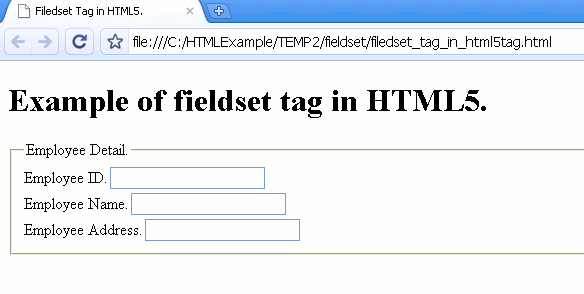
Implementation and use of fieldset tag. It is used for grouping related
controls of form. It is like a box.
It must start from <legend> tag, because <legend> tag defines title of field
set.
Declaration Syntax :
Declaration syntax of fieldset in HTML5.
| <fieldset> controls</fieldset> |
Attributes of fieldset:
| Attribute | Value | Description |
| disabled | boolean | Specify fieldset will be display or not. |
| name | value | Specify name of fieldset. |
| form | name of form | define it is related to this form. |
Example of <fieldset> in HTML5:
Code:filedset_tag_in_html5tag.html
|
<!DOCTYPE html > <html> <head><title>Filedset Tag in HTML5.</title></head> <body> <form> <h1>Example of fieldset tag in HTML5.</h1> <fieldset > <legend>Employee Detail.</legend> Employee ID.<input type="text" name="EmpId"><br> Employee Name.<input type="text" name="EmpName"><br> Employee Address.<input type="text" name="Empadress"><br> </fieldset> </form> </body> </html> |
Difference Between HTML5 and HTML4.01:
The fieldset tag is available in both HTML5 and HTML4.01. But there is some attribute in HTML5, that is not supported by HTML4.01.


