HTML 5 td Tag, Definition of <td> tag in html5
In this discussion, We will introduce about the use of <td> tag in html5.
In this discussion, We will introduce about the use of <td> tag in html5.HTML 5 td Tag, Definition of <td> tag in html5
In this discussion, We will introduce about the use of <td> tag in html5. This <td> tag is used for defining the table data or a cell in a table. The<td> tag is used within the <tr> tag. This tag must have opening and closing tags.
Declaration Syntax:
The declaration of this tag is as:
| <td> Cell Data </td> |
This tag have three specific attributes are as following:
colspan="value" The value of this attribute specify the no of columns to be spanned and must be a non negative integer.
rowspan="value" The value of this attribute specify the no of rows to be spanned and must be a non negative integer.
headers="value" The value of this attribute specify space saprated list of header .
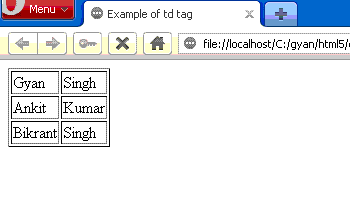
Example: td_tag.html
| <!DOCTYPE html> <html> <head> <title>Example of td tag</title> </head> <body> <table border="1"> <tr> <td> Gyan</td> <td> Singh</td> </tr> <tr> <td> Ankit</td> <td> Kumar</td> </tr> <tr> <td> Bikrant</td> <td> Singh</td> </tr> </table> </body> </html></html> |
Output:
Difference between html4.01 and html5.
Most of the html4.01 attributes are not supported by html5.


