HTML5 select tag, Implementation of <select>tag in HTML5.
In this section, you will learn about <select> tag of HTML5.
In this section, you will learn about <select> tag of HTML5.HTML5 select tag, Implementation of <select> tag in HTML5.
In this section, you will learn about <select> tag of HTML5. The select tag is use for providing drop-down list for the user. And the element of selection list can be added with the help of the <option> tag. You can use <optgroup> tag within <select> tag for grouping option.
Attributes of form:There are following attributes..
| Attributes | value | Description |
| autofocus | empty or autofocus | Element automatically highlighted. |
| disabled | disebled | Element does not receive focus of user. |
| form | string | Name of related form. |
| name | string | specify the name of select element. |
| multiple | multiple or empty | specify user can select multiple option |
| size | integer greater than zero | specify number of visible option for user in selection list. |
Declaration Syntax :
Declaration syntax of form in HTML5.
|
<select>
<option>Text</option> .................................... <option>Text</option> </select > |
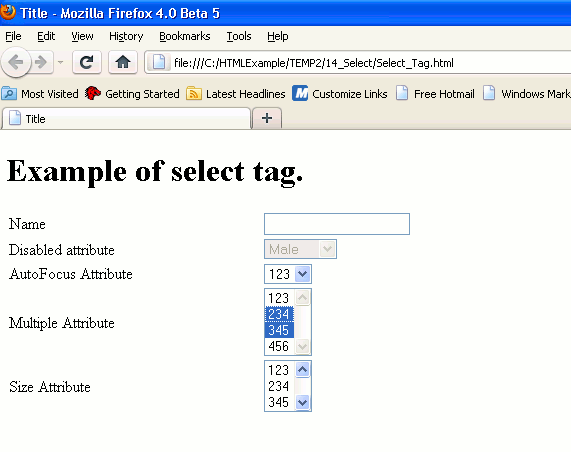
Example of <form> in HTML5:
Code:SelectTag.html
|
<!doctype html > <html> <head> <title>Title </title> </head> <body> <h1>Example of select tag.</h1> <form id="Selectform1"> <table style="width: 49%"> <tr> <td><label>Name</label></td> <td><input type="text"></td></tr> <tr> <td>Disabled attribute</td> <td><select disabled> <option>Male</option> <option>Female</option> </select></td> </tr> <tr> <td>AutoFocus Attribute</td> <td><select autofocus> <option>123</option> <option>234</option> <option>345</option> <option>456</option> </select></td> </tr> <tr> <td>Multiple Attribute</td> <td><select multiple="multiple"> <option>123</option> <option>234</option> <option>345</option> </select> </td> </tr> <tr> <td>Size Attribute</td> <td><select size="3"> <option>123</option> <option>234</option> <option>345</option> <option>456</option> </select></td> </tr> </table> </form> </body> </html> |
Difference Between HTML5 and HTML4.01:
The select tag is available in both HTML5 and HTML4.01.


