html5 disabled attribute, Example of disabled attribute of <textarea> tag in html5
In this tutorial, We will introduce you about the disabled attribute of the <textarea> tag in html5
In this tutorial, We will introduce you about the disabled attribute of the <textarea> tag in html5html5 disabled attribute, Example of disabled attribute of <textarea> tag in html5
In this tutorial, We will introduce you about the disabled attribute of the <textarea> tag in html5. This attribute is used to specify that the control is disabled or not. The user can not able to edit or input in the textarea.The disabled control is read only.
Declaration Syntax:
The attribute is used as in the <textarea> tag:
| <textarea disabled="value">Text Here</textarea> |
This attribute have following possible values.
- disabled. e.g. disabled="disabled"
- empty string. disabled=" "
- empty disabled
Example: disabled_attribute.html
<!DOCTYPE html><html>
<head>
<title>Example of disabled attribute</title>
</head>
<body>The textarea here.<br>
<form>
<textarea rows="5" cols="30" disabled="disabled">
This is the sample textarea with disabled.
</textarea><br><br>
<textarea rows="5" cols="30">
This is the sample textarea with out disabled.
</textarea><br>
</form>
</body>
</html>
Output:
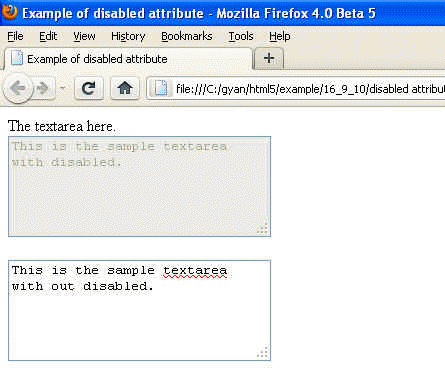
Difference between html4.01 and html5
This attribute is new in the html5.


