HTML5 bdo tag , Definition of <bdo> tag in html5.
In this section, you will learn about bdo tag of HTML5
In this section, you will learn about bdo tag of HTML5HTML5 bdo tag , Definition of <bdo> tag in html5.
In this illustration we informing about the use of <bdo> tag in html5. The <bdo>tag(bidirectional override) specifies the direction of text displaying. This tag is useful when the text is of the languages/scripts ,which are written from right to left and Bydefault HTML content is typically rendered from left to right. The<bdo> tag must have the ending </bdo> tag. The <bdo> tag doesn't alter the language or scripts, it serves as a identifier.
Declaration Syntax <bdo> tag:
| <bdo dir="value">Expression </bdo> |
The <bdo> tag has a specific attribute dir, which has two values as given below:
dir= " ltr " It specify the direction of text from left to right.
dir= " rtl " It specify the direction of text from right to left.
Example: bdotag.html
| <!DOCTYPE html> <html> <head> <title>Example of bdo tag</title> </head> <body> <p><b>using attribute value=rtl </b></p> <bdo dir="rtl">This is very easy to understand! </bdo><br> <p><b>using attribute value = ltr</b></p> <bdo dir="ltr">This is very easy to understand!</bdo> </body> </html> |
Output:
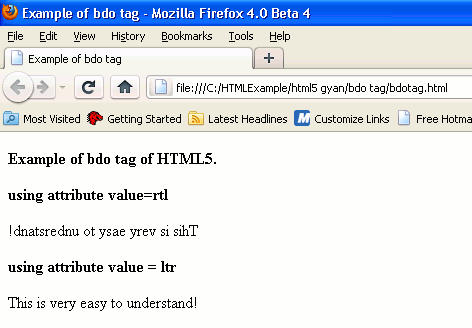
Note: See the browser compatible page for successfully rendering the program.


