
Model driven interface is an Action interface which provides a model object to pushed in to the value object in addition to action. In order to create a model driven action your class should extend ActionSupport class and also implement the ModelDriven interface. This interceptor is already present into the default stack.
The Model driven interface provides a single method getModel() this allows the model to be pushed into the value stack instead of action itself.
An example given below illustrates the model driven interface
StudentAction.java
<%@ taglib prefix="s" uri="/struts-tags" %>
<html>
<head>
</head>
<body>
<h1>ModelDriven Interface Example</h1>

<h2>Add Student</h2>
<s:form action="studentAction" >
<s:textfield name="studentName" label="Name" value=""/>
<s:textfield name="studentAge" label="Age" value=""/>
<s:submit />
</s:form>

</body>
</html>
studentInfo.jsp
<%@ taglib prefix="s" uri="/struts-tags" %>
<html>
<head>
</head>
<body>
<h1>ModelDriven Interface Example</h1>

<h2>Student Details</h2>
Name : <s:property value="studentName" /><br>
Age : <s:property value="studentAge" /><br>

</body>
</html>
StudentAction.java
package net.roseindia;
import com.opensymphony.xwork2.ActionSupport;
import com.opensymphony.xwork2.ModelDriven;

public class StudentAction extends ActionSupport
	implements ModelDriven{

	StudentBean student = new StudentBean();

	public String execute() throws Exception {

		return SUCCESS;

	}

	public Object getModel() {

		return student;
	}
}
StudentBean.java
package net.roseindia;
public class StudentBean{

	String studentName;
	int studentAge;
	public String getStudentName() {
		return studentName;
	}
	public void setStudentName(String studentName) {
		this.studentName = studentName;
	}
	public int getStudentAge() {
		return studentAge;
	}
	public void setStudentAge(int studentAge) {
		this.studentAge = studentAge;
	}

}
Now Mapping for the above Action class and JSP files in struts.xmlstruts.xml
<?xml version="1.0" encoding="UTF-8" ?>
<!DOCTYPE struts PUBLIC
"-//Apache Software Foundation//DTD Struts Configuration 2.0//EN"
"http://struts.apache.org/dtds/struts-2.0.dtd">

<struts>

<constant name="struts.enable.DynamicMethodInvocation" value="false" />
<constant name="struts.devMode" value="false" />

<package name="roseindia" extends="struts-default">


<action name="addStudent"
class="net.roseindia.StudentAction" >
<result name="success">/jsp/addStudent.jsp</result>
</action>

<action name="studentAction"
class="net.roseindia.StudentAction" >
<result name="success">/jsp/studentInfo.jsp</result>
</action>

</package>

</struts>
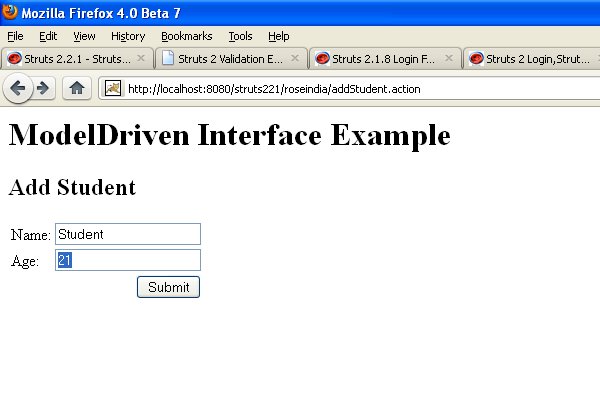
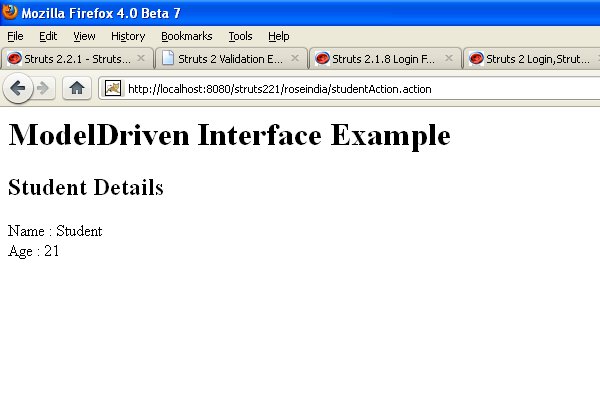
When you run this application it will display message as shown below:
 |
Advertisements
Ads
Ads
