
Create Data Grid in JSP page


This is detailed code that how to create data grid that shows data from database table in jsp page. In this jsp code given below we have used a tag library that provide some tags to create data grid. This code also provide facility to create paging and sorting, we can also specify number of data we want to see in one single page. This tag library provides some functions to calculate average and total.
First create table form where this data grid will fetch data and show in a jsp page. We have used database name 'mahendra' in this code and fetch data from table named 'employee_master' in same database.
Structure of table employee_master
CREATE TABLE `employee_master` (
                   `emp_id` int(10) NOT NULL auto_increment,
                   `firstName` varchar(20) default NULL,
                   `lastname` varchar(20) default NULL,
                   `salary` double default NULL,
                   `bonus` double default NULL,
                   PRIMARY KEY  (`emp_id`)
                 )
|
data_grid.jsp
<html>
<head>
<title>Example, Data Grid in jsp page</title>
</head>
<body>
<%@ page contentType="text/html"%>
<%@ page import="java.util.*, org.apache.taglibs.datagrid.
DataGridParameters, java.sql.*" %>
<%@ taglib uri="http://jakarta.apache.org/taglibs/datagrid-1.0"
prefix="ui" %>
<%@ taglib uri="http://java.sun.com/jstl/core" prefix="c" %>
<%@ taglib uri="http://java.sun.com/jstl/fmt" prefix="fmt" %>
<%! public class Employee {
protected String firstName;
protected String lastName;
protected double salary;
protected double bonus;
public String getFirstName () {
return (firstName);
}
public String getLastName (){
return (lastName);
}
public double getSalary () {
return (salary);
}
public double getBonus () {
return (bonus);
}
public void setFirstName (String newFirstName)
{
firstName = newFirstName;
}
public void setLastName (String newLastName)
{
lastName = newLastName;
}
public void setSalary (double newSalary)
{
salary = newSalary;
}
public void setBonus (double newBonus)
{
bonus = newBonus;
}
}
%>
<% ArrayList employees = new ArrayList ();
Employee objEmployee;
int fromIndex, toIndex;
try {
String connectionURL = "jdbc:mysql://localhost:3306/mahendra";
Connection connection = null;
Statement statement = null;
ResultSet rs = null;
Class.forName("com.mysql.jdbc.Driver").newInstance();
connection = DriverManager.getConnection(connectionURL,
"root", "root");
statement = connection.createStatement();
String QueryString = "SELECT * from employee_master";
rs = statement.executeQuery(QueryString);
while (rs.next()) {
objEmployee = new Employee ();
objEmployee.setFirstName(rs.getString("firstname"));
objEmployee.setLastName(rs.getString("lastname"));
objEmployee.setSalary(rs.getDouble("salary"));
objEmployee.setBonus(rs.getDouble("bonus"));
employees.add(objEmployee);
}
rs.close();
statement.close();
connection.close();
}
catch (Exception ex) {
System.out.println("Unable to connect to batabase."+ex);
}
fromIndex = (int) DataGridParameters.getDataGridPageIndex (request,
"datagrid1");
if ((toIndex = fromIndex+4) >= employees.size ())
toIndex = employees.size();
request.setAttribute ("employees", employees.subList(fromIndex, toIndex));
%>
<style>
th a:link { text-decoration: none; color: black }
th a:visited { text-decoration: none; color: black }
.rows { background-color: white }
.hiliterows { background-color: #848484; color: white;
font-weight: bold }
.alternaterows { background-color: #D8D8D8 }
.header { background-color: #2E2E2E; color: #D8D8D8;font-weight:
bold }
.datagrid { border: 1px solid #C7C5B2; font-family: arial;
font-size: 9pt;
font-weight: normal }
</style>
<meta http-equiv="Content-Type" content="text/html; charset=iso-8859-1">
<ui:dataGrid items="${employees}" var="employee" name="datagrid1"
cellPadding="0"
cellSpacing="0" styleClass="datagrid">
<columns>
<column width="50">
<header value="Select" hAlign="center" styleClass="header"/>
<item>
<![CDATA[
<input type="checkbox" align="center" name="employee"
value="${employee.firstName} ${employee.lastName}"/>
]]>
<aggregate function="count" var="total"/>
</item>
</column>
<column width="150">
<header value="Name" hAlign="center" styleClass="header"/>
<item value="${employee.firstName} ${employee.lastName}" hAlign="left"
hyperLink="http://www.roseindia.net" hyperLinkTarget="_blank"
styleClass="item"/>
<aggregate function="count" var="total"/>
</column>
<column width="200">
<header value="Salary (INR)" hAlign="center" styleClass="header"/>
<item value="${employee.salary}" hAlign="right" pattern="#,##0.00
" styleClass="item"/>
<aggregate function="avg" pattern="#,##0.00 " var="total"/>
</column>
<column width="200">
<header value="Bonus (INR)" hAlign="center" styleClass="header"/>
<item value="${employee.bonus}" hAlign="right" pattern="#,##0.00 "
styleClass="item"/>
<aggregate function="avg" pattern="#,##0.00 " var="total"/>
</column>
</columns>
<rows styleClass="rows" hiliteStyleClass="hiliterows"/>
<alternateRows styleClass="alternaterows"/>
<paging size="4" count="11" custom="true" nextUrlVar="next"
previousUrlVar="previous" pagesVar="pages"/>
<order imgAsc="up.gif" imgDesc="down.gif"/>
</ui:dataGrid>
<table width="500" style="font-family: arial; font-size: 10pt">
<tr>
<td align="left" width="33%">
<c:if test="${previous != null}">
<a href="<c:out value="${previous}"/>">Previous</a>
</c:if>
</td>
<td align="center" width="33%">
<c:forEach items="${pages}" var="page">
<c:choose>
<c:when test="${page.current}">
<b><a href="<c:out value="${page.url}"/>">
<c:out value="${page.index}"/></a></b>
</c:when>
<c:otherwise>
<a href="<c:out value="${page.url}"/>"><c:out value="${page.index}"/></a>
</c:otherwise>
</c:choose>
</c:forEach>
</td>
<td align="right" width="33%">
<c:if test="${next != null}">
<a href="<c:out value="${next}"/>">Next</a>
</c:if>
</td>
</tr>
</table>
</body>
</html>
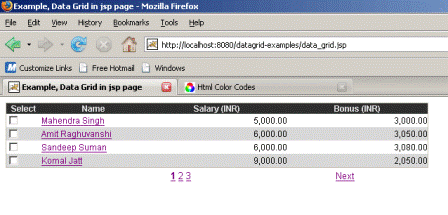
When user clicks on link 'next' this shows next four data from the table......

