JavaScript location.replace() method


JavaScript method location.replace(URL) immediately redirects to the specified URL location. After calling replace() method ,you cannot go back to the previous URL using browser's "Back" button. Syntax for replace() method is as follows :
Syntax :
| location.replace(URL); |
Where URL is the location which is to be replaced by current browser's history entry.
Description of code :
To illustrate the use of location.replace() method here we have created a simple HTML page into which we have created a button which calls the function replaceLocation(). Functionality of this function is to call method location.replace().
  function replaceLocation(){
   location.replace('http://www.roseindia.net/javascript');
 }
|
Now you cannot go back to the previous URL location since it is replaced with the current URL "www.roseindia.net/javascript". Here is the full example source code as follows :
<html>
<body>
<script language="JavaScript">
 function replaceLocation(){
   location.replace('http://www.roseindia.net/javascript');
 }
</script>
<div style="background: #ff9900; width:'100%';"
       align="center">
  <font color="#0000ff" size="12pt">
	<b>Replace Location Example</b>
  </font>
 </div>
  <center>
    <div style="background: #0099ff; width:'100%';"
         align="center">
		<input type="button" value="Go to
            http://www.roseindia.net/javascript"
          onClick="replaceLocation()" />
	</div>
  </center>
</body>
</html>
|
Output :
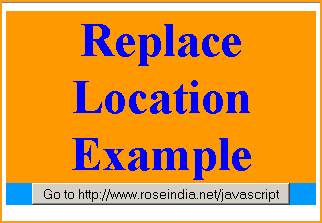
Click on the button "Go to http://www.roseindia.net/javascript"

You can see that in address bar location is replaced with the http://www.roseindia.net/javascript