
In this section, we are providing you an example based on class TextHitInfo. In the given example, when you click the element of the string, TextHitInfo class will displayed the position of character on the console.

TextHitInfo Example


In this section, we are providing you an example based on class TextHitInfo. In the given example, when you click the element of the string, TextHitInfo class will displayed the position of character on the console.
The method hitTestChar() returns a TextHitInfo to the specified point. A string is defined. The Font class represents the font. The class FontRenderContext measures the text.
Here is the code of TextHitExample.java
|
import java.awt.*; import javax.swing.*; import java.awt.event.*; import java.awt.font.*; public class TextHitExample extends JPanel { private TextLayout textLayout; private int X = 45, Y = 85; public TextHitExample() { addMouseListener(new MouseAdapter() { public void mouseClicked(MouseEvent event) { TextHitInfo textHit = textLayout.hitTestChar(event.getX()- X, event.getY()- Y); System.out.println(textHit); } }); } public void paint(Graphics g) { Graphics2D g2d = (Graphics2D) g; String text = "Java is an Object Oriented Programming Language"; Font font = new Font("Arial Narrow", Font.PLAIN, 20); if (textLayout == null) { FontRenderContext fontRenderContext =g2d.getFontRenderContext(); textLayout = new TextLayout(text, font, fontRenderContext); } textLayout.draw(g2d, X, Y); } public static void main(String[] args) { JFrame frame = new JFrame("Show Text Hit"); frame.getContentPane().add(new TextHitExample()); frame.setSize(440, 200); frame.show(); } } |
Output will be displayed as:
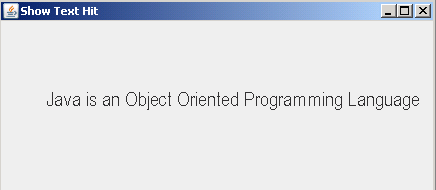
If you click the element J, the position i.e.0 is displayed on the console as given. Similarly on clicking P, the position i.e. 27 is displayed.

