In this section, you will learn to display the hierarchical data in JTree . When you select the hierarchical data it is also displayed on the command prompt.
Displaying Hierarchical data in JTree


In this section, you
will learn to display the hierarchical data in JTree . When you select
the hierarchical data it is also displayed on the command prompt.
Program Description:
The following program constructs a tree that displays
the hierarchical data. Here CellRenderer class extends JLabel
and implements TreeCellRenderer. It displays the tree node like: File,
Subfile and SubNode. The getTreeCellRendererComponent() method
sets the value of the current tree cells. If your selection is 'true' (if any
node is selected ), the cell is expanded and the selected node is displayed . The StringBuffer class implements a mutable
sequence of characters. The TreeSectionListener listens to any change
needed for the TreeSeclectionModel. The TreeSectionEvent
handles the changes to be made in the current
selection.
Finally, you get a tree that displays
hierarchical data . This tree is displayed on the JFrame.
Here is the code of this program:
import javax.swing.*;

import javax.swing.event.*;

import javax.swing.tree.*;

import java.awt.*;


public class DisplayingJTreeData {

  class CellRenderer extends JLabel implements TreeCellRenderer {

  CellRenderer(){}

  public Component getTreeCellRendererComponent

	(JTree tree, Object value,boolean

  selected, boolean expanded, boolean file, int row,boolean hasFocus){

  StringBuffer buffer = new StringBuffer();

  if (expanded)

  buffer.append("File:");

  if (file)

  buffer.append("Subfile:");

  if (hasFocus)

  buffer.append("SubNode:");

  buffer.append(row + "->");

  buffer.append(value.toString());

  setForeground(selected ? Color.RED : Color.RED);

  setText(buffer.toString());

  return this;

  }

  }

  public DisplayingJTreeData() {

  JFrame frame = new JFrame("Displaying Data Tree frame");

  DefaultMutableTreeNode javaBook = new DefaultMutableTreeNode("JavaBook");

  DefaultMutableTreeNode javaDeveloper = new DefaultMutableTreeNode

	("JavaDevelopers");

  DefaultMutableTreeNode java = new DefaultMutableTreeNode("Java");

  DefaultMutableTreeNode javaTeamName=new DefaultMutableTreeNode

	("JavaTeamName");

  javaBook.add(javaDeveloper);

  javaBook.add(javaTeamName);

  String javaTeams[] = { "Programmer", "Coding", "Tester",

	 "ProjectDesigner  ",

  "ProjectDeveloper", "ProjectManager", "SinearProgramer",

	"JuniarProgramer"};

  for (int i = 0, n = javaTeams.length; i < n; i++)

  javaDeveloper.add(new DefaultMutableTreeNode(javaTeams[i]));

  String teamNames[]={"Amar","Vinod","Chandan","Sushil","Rajesh",

	"Amit","Suman","Santosh"};

  for (int i = 0, n = teamNames.length; i < n; i++)

  javaTeamName.add(new DefaultMutableTreeNode(teamNames[i]));

  javaBook.add(java);

  String bookLabels[] = { "JavaTutorial", "JavaProgram", "JavaNews",

	 "Java","project",


 "JavaDevelopment"};

  for (int i = 0, n = bookLabels.length; i < n; i++)

  java.add(new DefaultMutableTreeNode(bookLabels[i]));

  JTree tree = new JTree(javaBook);

  tree.addTreeSelectionListener(new TreeSelectionListener() {

  public void valueChanged(TreeSelectionEvent e) {

  TreePath treepath = e.getPath();

  System.out.println("Java: " + treepath.getLastPathComponent());

  Object elements[] = treepath.getPath();

  for (int i = 0, n = elements.length; i < n; i++) {

  System.out.print("->" + elements[i]);

  }

  System.out.println();

  }

  });

  DefaultMutableTreeNode file = javaBook.getLastLeaf();

  TreePath path = new TreePath(file.getPath());

  tree.setSelectionPath(path);

  tree.setCellRenderer(new CellRenderer());

  JScrollPane scroll = new JScrollPane(tree);

  Container c = frame.getContentPane();

  c.add(scroll, BorderLayout.CENTER);

  frame.setDefaultCloseOperation(JFrame.EXIT_ON_CLOSE);

  frame.setSize(350, 300);

  frame.setVisible(true);

  }

  public static void main(String args[]){

  try {

  UIManager.setLookAndFeel

	("com.sun.java.swing.plaf.windows.WindowsLookAndFeel");

  }

  catch (Exception evt) {}

  new DisplayingJTreeData();

  }

}
|
Download this program.
Output of the program:
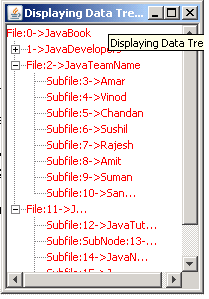
After clicking tree node the message is displayed
on the command prompt.
C:\javaswing>javac DisplayingJTreeData.java
C:\javaswing>java DisplayingJTreeData
Java: JavaDevelopment
->JavaBook->Java->JavaDevelopment
Java: Vinod
->JavaBook->JavaTeamName->Vinod
Java: Amit
->JavaBook->JavaTeamName->Amit
Java: JavaProgram
->JavaBook->Java->JavaProgram
|