Home Java Example Java Awt How to create LineDraw In Java


How to create LineDraw In Java
Posted on: March 13, 2008 at 12:00 AM
This is a simple java program . In this section, you will learn how to create Line Drawing. This program implements a line Drawing component. A java program explains the stroke line i.e. how to make thick and thin line.
How to create LineDraw In Java


Introduction

This is a simple java program . In this section, you will learn how to create Line Drawing. This program  implements a line Drawing component. A java program explains the stroke line i.e. how to make thick and thin line. For this we have used  BasicStroke class. This object is passed to the setStroke() method.

Program Description:

First of all, define a class named, LineDraw in program for creating a java AWT Line Drawing component. This program uses the setStroke() method. The stroke describes the pen and brush. It is used for drawing the line. This controls all drawing line attribute. It is a suitable of all line drawing needs. 

BasicStroke(): This is a constructor component. A BasicStroke object is used for several different-different line drawing attributes. The BasicStroke() objects are immutable, So its can be safely cached and shared.

Here is the code of this Program:

import java.awt.*;
import java.awt.event.*;
import java.awt.geom.*;

public class LineDraw extends Frame{
  Line2D line1 = new Line2D.Double(00200200);
  Line2D line2 = new Line2D.Double(7080100200);
  Line2D line3 = new Line2D.Double(100150150,150);
  Stroke drawingStroke = new BasicStroke(2);
 public void paint(Graphics g) {
  Graphics2D graph = (Graphics2D)g;
  graph.setStroke(drawingStroke);
  graph.setPaint(Color.green);
  graph.draw(line1);
  graph.setPaint(Color.red);
  graph.draw(line2);
  graph.setPaint(Color.yellow);
  graph.draw(line3);

  }

  public static void main(String args[]) {
  Frame frame = new LineDraw();
  frame.addWindowListener(new WindowAdapter(){
  public void windowClosing(WindowEvent we){
  System.exit(0);
 }
  });
  frame.setSize(300250);
  frame.setVisible(true);
 }
}

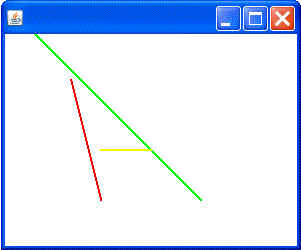
Output of this program:

Download this program. 

Related Tags for How to create LineDraw In Java:
javaccomclasstablecontrolsuiscriptobjectcontroliodrawingmakemethodsedipcomponentawtsetsnameattributelinethisaisetsimplecreatetabbasicdefineforprogramtodrawlearnrambasicsrawsseshdescriptioneareilitdessectionlsliicsusepeimfirstinpasscsasmnttrthinbrushjclesemallpennamedmehowobjproexplaincreatingdescribessueeatkisirhallmpleaandarstrsimxpwingwtvausesttscrssriripthavbesstabablatifinjepleplplaiprndonomogrolo


More Tutorials from this section

Ask Questions?    Discuss: How to create LineDraw In Java   View All Comments

Post your Comment


Your Name (*) :
Your Email :
Subject (*):
Your Comment (*):
  Reload Image


Ask Questions?

If you are facing any programming issue, such as compilation errors or not able to find the code you are looking for.

Ask your questions, our development team will try to give answers to your questions.