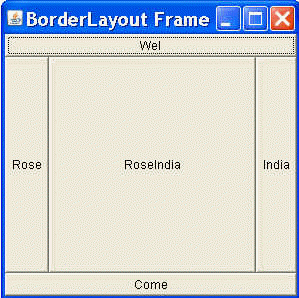
In this section, you will learn how to create BorderLayout in java awt package. The Border Layout is arranging and resizing components to set in five position which is used in this program. The java program uses and declares all positions as a NORTH, SOU
BorderLayout Example In java


Introduction
In this section, you will learn how to create
BorderLayout in java awt package. The Border Layout is arranging and resizing components to
set in five position which is used in this program. The java program uses and declares
all positions as a NORTH, SOUTH, WEST, EAST, and
CENTER. Here, you will understand about this position how to use in this program.
Program Description:
Following program uses the BorderLayout class for creating Button and set on the frame. Here, define the class named BorderLayoutExample for using this program. This Java Application uses BorderLayout for setting the position on the frame.
BorderLayout(): This is default constructors of the class Border layout class. This class constructs a new border layout without any gaps between components.
Here is the code of this program:
import java.awt.*;
|
Output this program: